TestRail Integration — Sync CI Test Results Automatically
Automatically export Jenkins, GitLab, and GitHub test results to TestRail. Create test cases, runs, and plans from CI builds with zero manual effort.
Every time a CI build completes, your test results should appear in TestRail automatically. No manual uploads. No custom scripts. No missed runs.
BuildButler connects your CI pipeline to TestRail and syncs test results on every build. Test cases are created or updated, test runs are populated, and your TestRail project stays current without anyone lifting a finger.
How it works
BuildButler exports test results to TestRail by creating or updating test cases, test runs, and test plans. Configure export rules as a JSON array where each object targets a set of CI jobs.
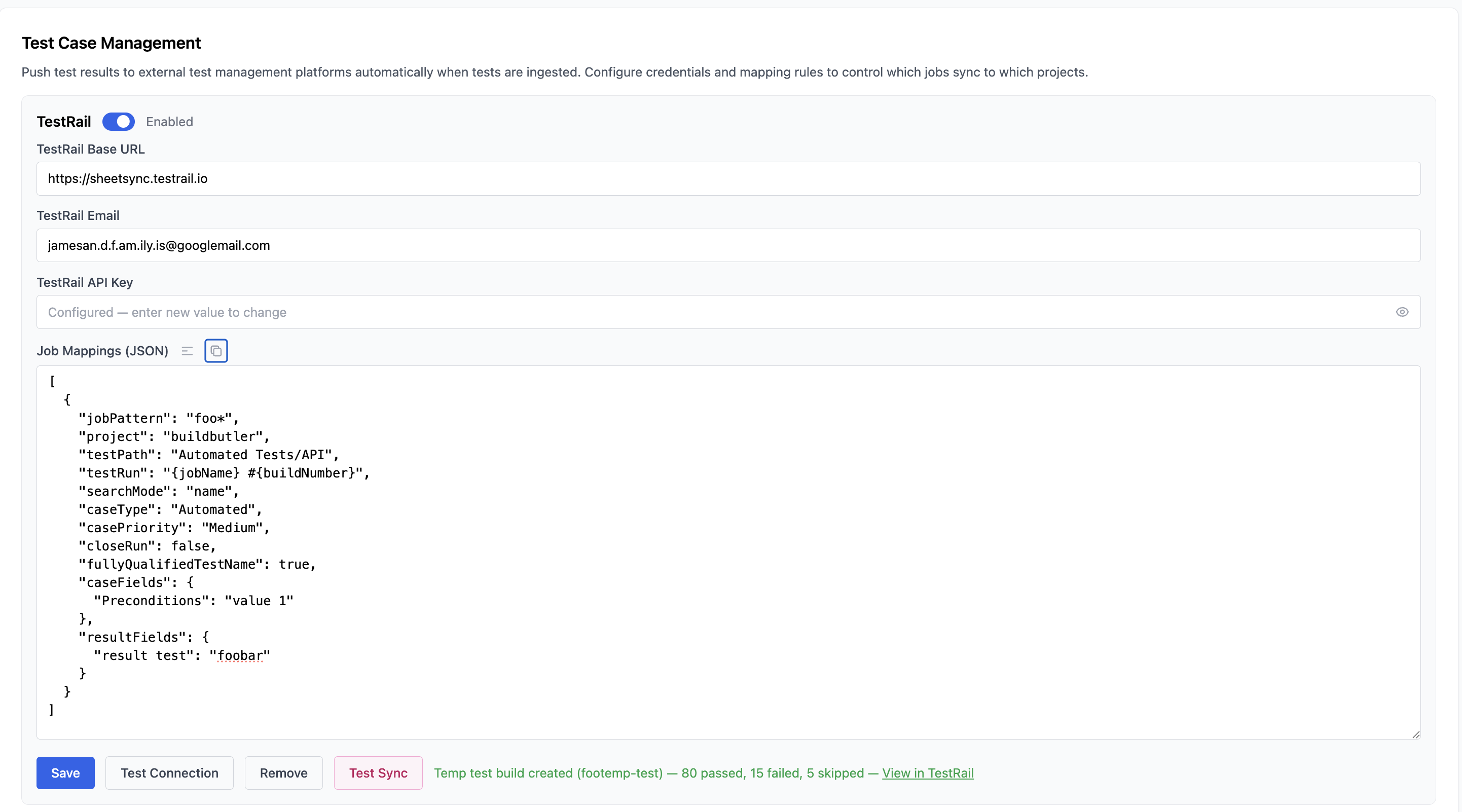
Configuration example
Template variables
| Variable | Description |
|---|---|
{jobName} | CI job name |
{buildNumber} | Build number |
{branch} | Git branch name |
{date} | Build date (YYYY-MM-DD) |
Key features
Automatic test case creation
When BuildButler encounters a test that doesn't exist in TestRail, it creates the test case automatically in the specified testPath. Existing tests are matched by name or full class path (configurable via searchMode).
Test runs and plans
Create standalone test runs or organize them under test plans. Use milestonePath to associate runs with TestRail milestones — milestones are created automatically if they don't exist.
Custom fields
Map custom TestRail fields on both test cases and results:
Upload modes
| Mode | Behaviour |
|---|---|
0 (default) | Create new cases and update existing |
1 | Create new cases only |
2 | Update existing cases only |
3 | Do not create or update cases (results only) |
Supported CI systems
TestRail integration works with all CI systems that BuildButler supports:
- Jenkins (plugin or API)
- GitHub Actions
- GitLab CI
- TeamCity
- BuildKite
Getting started
- Sign up for BuildButler (free tier includes TestRail integration)
- Connect your CI system
- Enter your TestRail credentials in System Settings
- Define your job mapping rules as JSON
- Run a build — test cases and results appear in TestRail
See the full TestRail configuration reference for all available fields.