Flaky Tests
Automatically detect and track tests that intermittently pass and fail across builds.
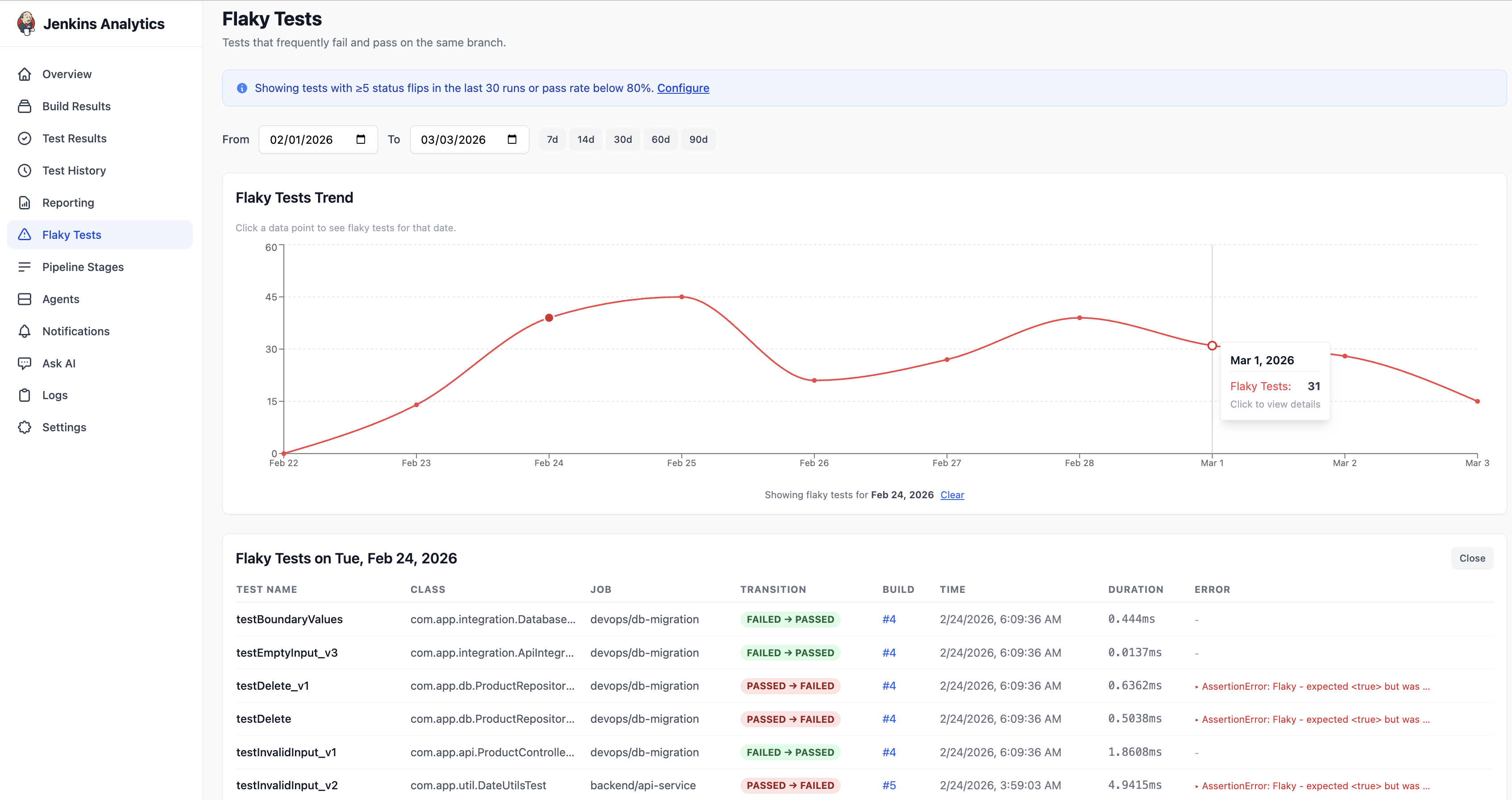
The Flaky Tests page identifies tests that frequently flip between pass and fail on the same branch — a common source of developer frustration and eroded pipeline confidence.
How flaky detection works
BuildButler analyses test results across consecutive builds and flags tests that meet either of these criteria:
- Transition Count — tests with 5 or more status flips in the last 30 runs
- Reliability Threshold — tests with a pass rate below 80%
Both thresholds are configurable in Settings → Flaky Tests. An info banner at the top of the page shows the current detection rules, with a Configure link to adjust them.
Flaky Tests Trend chart
A line chart showing the total number of flaky tests detected per day over the selected date range. This helps you track whether flakiness is improving or getting worse.
Click any data point on the trend line to see the specific flaky tests for that date. A table appears below showing:
| Column | Description |
|---|---|
| Test Name | Name of the flaky test |
| Class | Fully-qualified test class |
| Job | Jenkins job that ran the test |
| Transition | Status change direction (e.g. FAILED → PASSED, PASSED → FAILED) |
| Build | Build number (clickable link) |
| Time | Timestamp of the build |
| Duration | Test execution time |
| Error | Error message if the test failed |
Date range
The date range picker supports quick presets: 7d, 14d, 30d, 60d, 90d, or a custom From / To range.
Configuring flaky detection thresholds
Navigate to Settings → Flaky Tests to adjust:
| Setting | Default | Description |
|---|---|---|
| Transition Count | 5 flips in 30 runs | How many status flips trigger the flaky flag |
| Reliability Threshold | 80% | Tests below this pass rate are flagged |
Click Save to apply changes, or Reset to Defaults to restore the original thresholds.
Tips for reducing flakiness
- Start with the most frequently-flipped tests at the top of the list
- Use the Test History page to inspect the Duration Trend and Status Timeline for each flaky test
- Tag flaky tests to track them and assign ownership
- Consider quarantining consistently flaky tests while you investigate